nuts-knooppunt
Deployment
This page describes how to deploy the Knooppunt.
The diagrams on this page were created using Structurizr, files are generated using generate.sh.
Overview
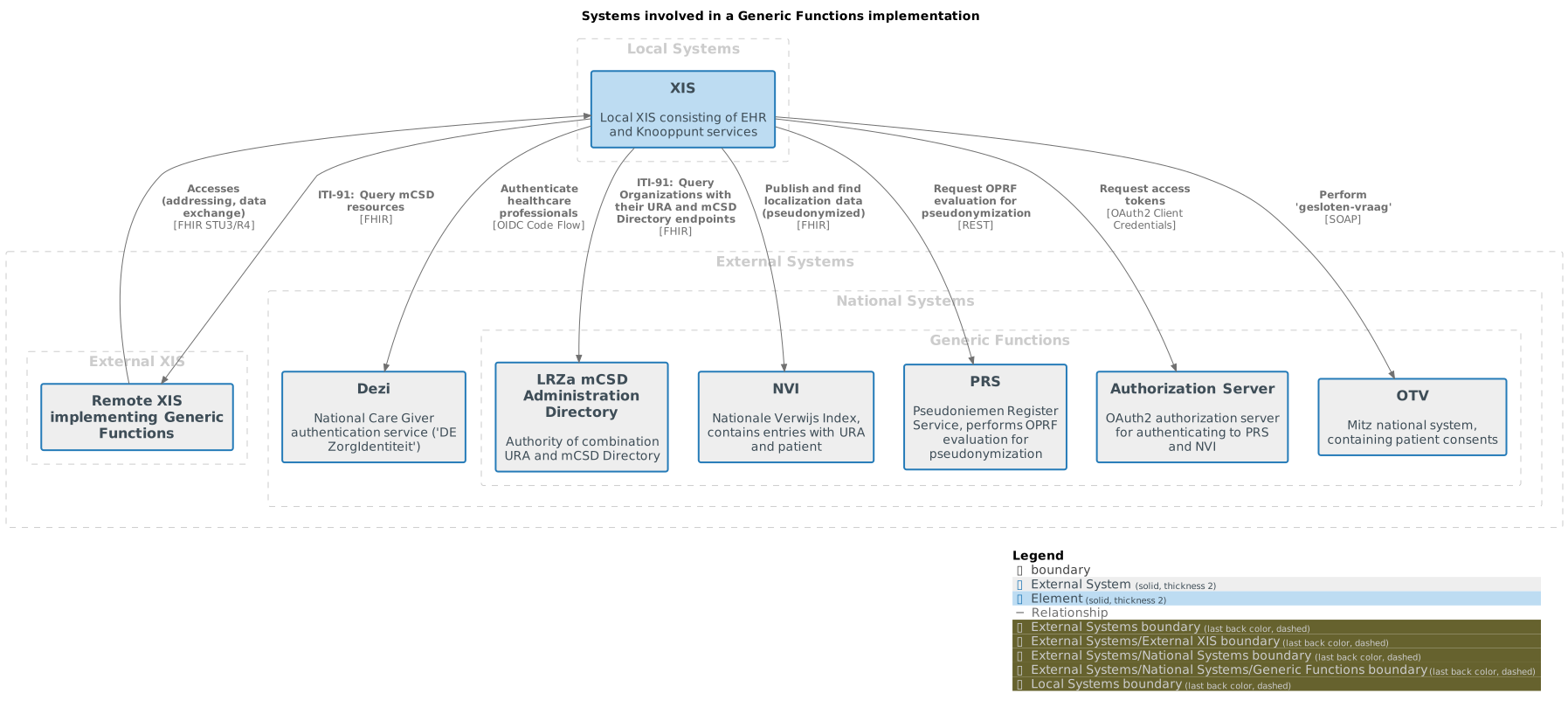
Deployment
The diagram below shows which containers must be deployed.
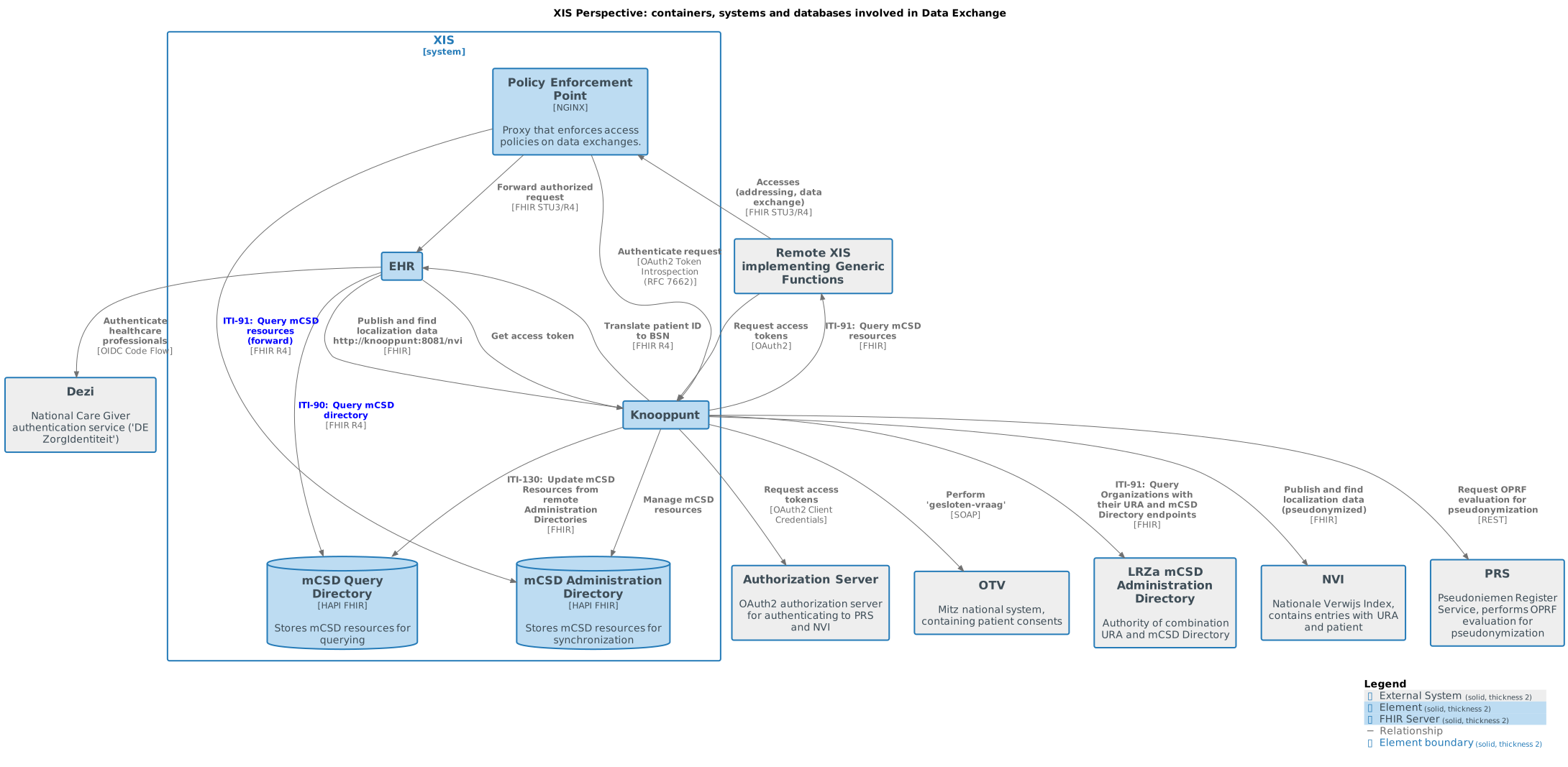
Per Generic Function
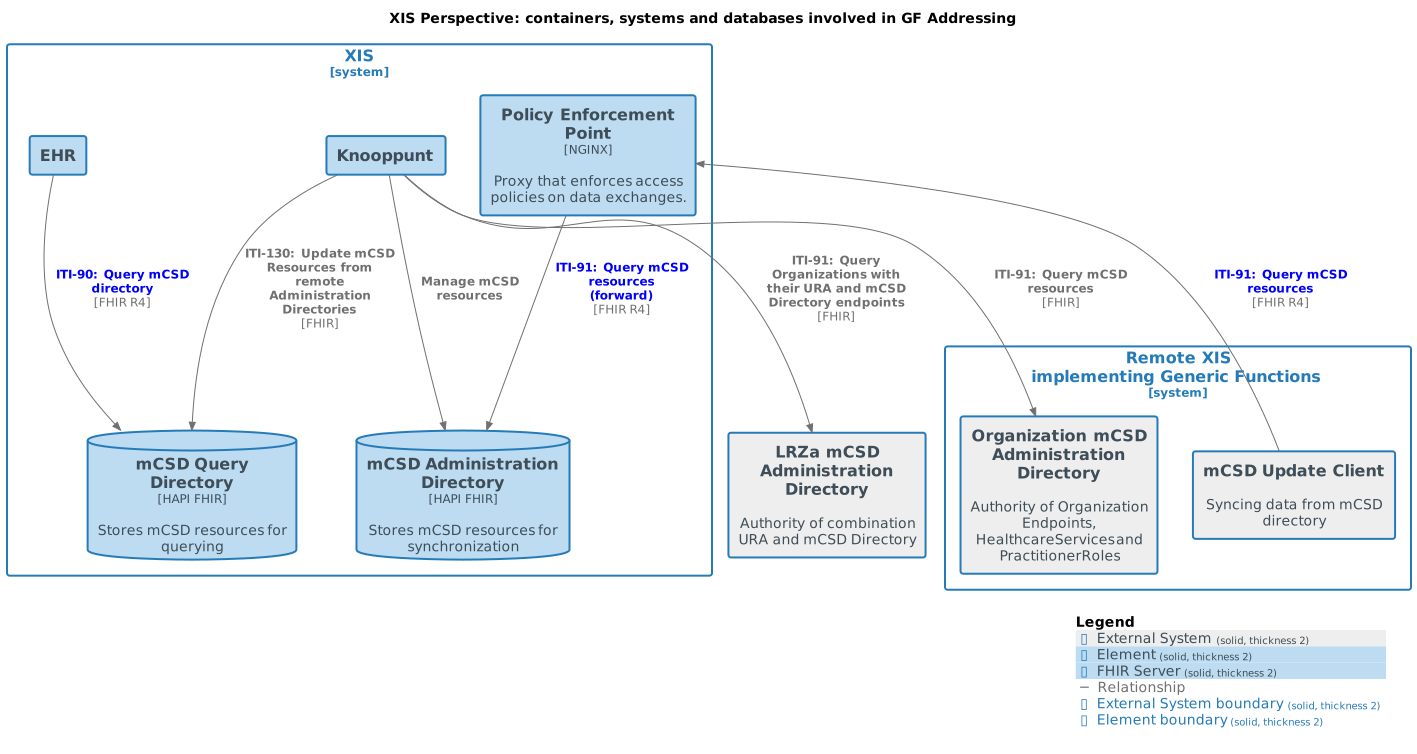
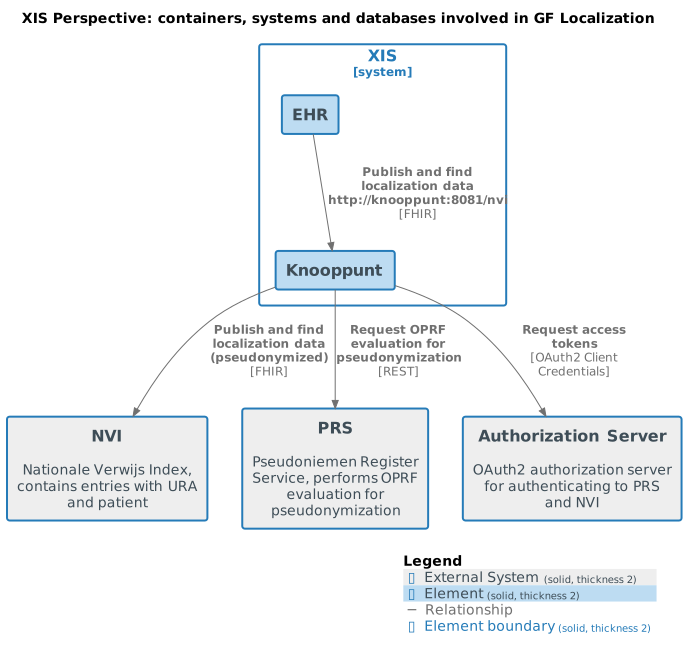
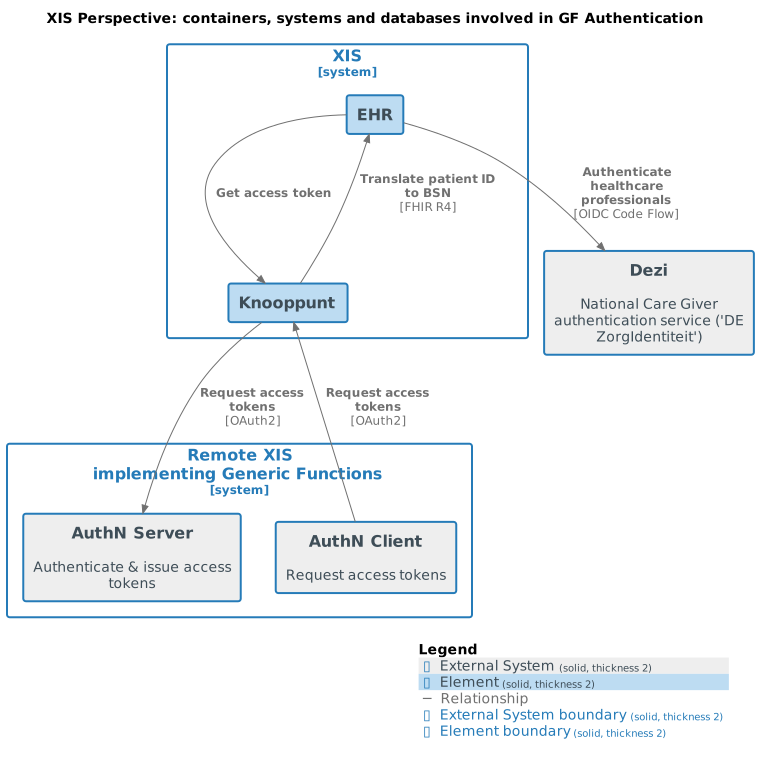
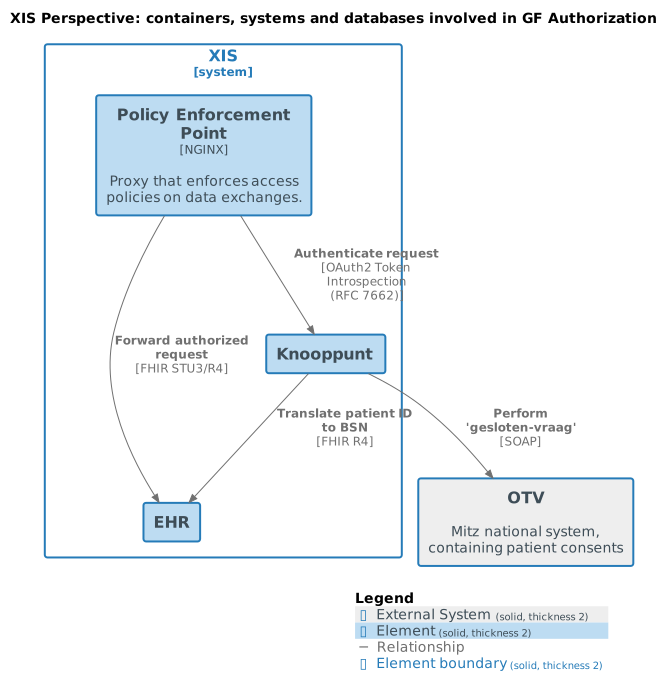
The following sections show the containers involved per generic function.
GF Addressing
GF Localization
GF Authentication
GF Authorization
Technology
The Knooppunt is provided as a Docker image: docker pull ghcr.io/nuts-foundation/nuts-knooppunt:0.1.2
(see the repository) for the latest version.
Refer to the Nuts node documentation for details on how to set up and configure the embedded Nuts node.
The Knooppunt requires a FHIR server for the mCSD Directories, you can use HAPI FHIR server for this.
Generic Functions
This chapter describes when/how to deploy specific generic functions of the Knooppunt.
See CONFIGURATION.md for detailed configuration options.
Addressing
To participate in the addressing generic function Knooppunt will connect to several FHIR APIs to synchronize data, according to the mCSD profile:
- a Root Administration Directory, authoritative on care organizations and their Administration Directory endpoints,
- Administration Directories of care organizations, discovered through the Root Administration Directory.
- a local Query Directory where the synchronisation process will put data received from other organisations
For your own Knooppunt, you need to:
- provide a FHIR API for the Query Directory
- provide a FHIR API for the Administration Directory, containing your care organization registrations, that other Knooppunt instances can query.
- You can use the embedded mCSD Admin Editor web application (
/mcsdadmin) to maintain this directory.
- You can use the embedded mCSD Admin Editor web application (
- configure the Root Administration Directory
A multi tenant HAPI server can be used for hosting both the admin and query directory. We recommend to keep this data separate, but you can choose to combine the data in a single tenant if so desired.
Using the mCSD Administration Application
The Knooppunt contains a web-application to manually manage the mCSD Administration Directory entries (e.g. create organizations and endpoints). This web-application uses the mCSD Administration Directory FHIR API to create/update/delete these resources.
Set mcsdadmin.fhirbaseurl to the FHIR base URL of the mCSD Administration Directory to use the embedded mCSD Admin (web-)Application.
NOTE: Alternatively, the vendor can choose to manage the mCSD Administration Directory outside the Knooppunt, for example through an existing care organization/endpoint database or API.
Examples when a vendor doesn’t manage the mCSD Administration Directory through the embedded mCSD Admin (web-)Application include:
- the vendor manages its mCSD information directly in a database (e.g. an SQL database)
- the vendor syncs its mCSD information from another system (e.g. an ERP system) to the mCSD Administration Directory
Localization
To enable the NVI-endpoint of the Knooppunt, you need to provide a base URL for the NVI service, as provided by the ministry of health (VWS).
Set nvi.baseurl to the base URL of the NVI service.
NOTE: During preliminary testing, an example NVI is available on this URL:
https://knooppunt-test.nuts-services.nl/nvi
Inbound data requests
To handle inbound data requests, you need to deploy a Policy Enforcement Point (PEP) in front of the Knooppunt. This is typically a reverse proxy that performs authentication and authorization of incoming requests.
An example PEP using NGINX can be found here.
Nuts node
The Knooppunt can be deployed with an embedded Nuts node. If a vendor has an existing Nuts node, or wants to have the Nuts node deployed separately, the Knooppunt can use that Nuts node instead.
Use nuts.enabled to configure the embedded or existing Nuts node.
Note that you MUST configure the url (or NUTS_URL) property in the Nuts configuration to point to the publicly accessible base URL of the Knooppunt (the URL under which other Nuts nodes and clients can reach it). This is the URL the Nuts node advertises externally.
The Knooppunt runs the embedded Nuts node on /nuts, so if the Knooppunt is publicly reachable at https://knooppunt.example.com/, the Nuts node URL must be https://knooppunt.example.com/nuts (not an internal-only address such as http://knooppunt:8080/nuts).
Tracing
The Knooppunt supports distributed tracing using OpenTelemetry. Traces can be sent to any OTLP-compatible collector (e.g. Jaeger, Grafana Tempo, or a vendor’s existing observability platform).
To enable tracing, set tracing.otlpendpoint to the address of your OTLP collector.
Span names are formatted as METHOD /path (e.g. POST /mcsd/update). The component can be identified from the path prefix (/mcsd/*, /nvi/*, /pdp/*) and filtered using the http.target tag.
See CONFIGURATION.md for all tracing options.